.svg)
Grasshopper is one of the best suppliers of voip for businesses on the market. It is especially popular with individual entrepreneurs and small business owners due to its simple product offerings, unrestricted functions, and affordable price.
Here are some of the features you can get with Grasshopper:
With Grasshopper, you'll be able to separate personal and business calls, allowing you to market your business professionally from the start. Grasshopper is a great choice for small business owners.
Grasshopper is for:

Easily manage your business and personal contacts on the same device with Grasshopper, while maintaining the confidentiality of your private number.
Your business will benefit from a professional image, but managing two numbers could be complex with intensive use.
Choose a number that represents your brand with Grasshopper to build credibility and improve your professional image from the first call.
This feature solidifies your market presence, although finding the ideal vanity number may require additional research.

Turn your phone into a mobile business center with Grasshopper, allowing business call management on the go.
Ideal for professionals on the go, this feature may be less suitable for those who prefer fixed telephone equipment.
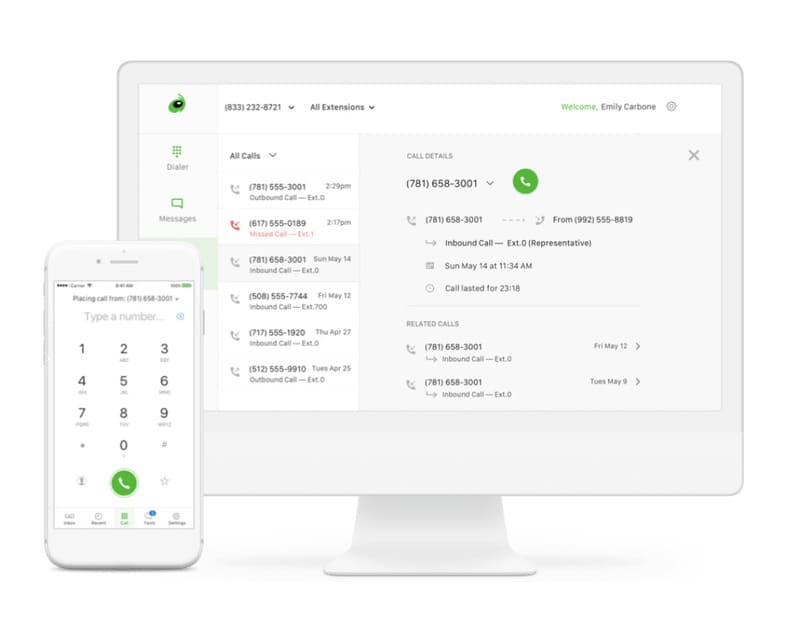
Grasshopper ensures constant communication with your customers, with features that ensure you don't miss important calls.
A major asset for customer engagement, although managing voice messages via email may not be right for everyone.
Step into the digital age by integrating fax and voicemail into your phone system with Grasshopper.
A step towards the digitalization of communications, this innovation may require a period of adjustment for some users accustomed to traditional methods.
Grasshopper price levels, when billed annually, are as follows:

If you're not sure which option is best for you, why not try Grasshopper for free and see for yourself?
GoTo (formerly LogMeIn), a company that merged with Citrix and bought Grasshopper, has an extensive knowledge base on its support website.
If you can't find an answer to your question there, you can open a ticket, call support, or contact the sales team, depending on the nature of your problem. The customer service team is based in the United States and is available 24 hours a day, 7 days a week.
However, Grasshopper phone support is a hassle to say the least. Many users complain that they have not received a response to their messages or calls. Those who did were not entirely happy with the result.
Despite the abundance of online guides and resources, the reliability of the Grasshopper support team is not their strong suit.
In this section of the Grasshopper review, you can see how it stacks up against some of the best professional VoIP service providers on the market.
Here is an overview of alternatives to Grasshopper using a structure similar to that used for Grasshopper, with detailed introductions, bullet point features, pricing, and a critical conclusion for each solution.
RingCentral is a recognized leader in the VoIP services market, offering a comprehensive range of features for businesses.
Features:
Pricing
While RingCentral offers a wider range of features and is suitable for larger businesses, its cost can be a barrier for smaller businesses who find Grasshopper an alternative that is more affordable and sufficient for their initial needs.
Nextiva is considered by many to be the best VoIP system for small and medium businesses, ideal for those planning to expand.
Features
Pricing
Nextiva stands out as a smart choice for growing businesses, thanks to its ability to adapt to the evolving needs of businesses. It's a solid Grasshopper alternative for those who want more than just a phone system and need a platform that grows with them.
GoToConnect (formerly known as Jive) offers a flexible VoIP solution with responsive customer support, despite some reported issues with its mobile app.
Features
Pricing
GoToConnect is positioned as a more versatile option than Grasshopper, offering greater flexibility and more responsive customer support. However, its per-user pricing structure can be expensive for businesses with many employees, making Grasshopper a more economical option for smaller teams.
To get started with Grasshopper, you need to... :
You can choose a local number, a fancy number, or a 1-800 number.
To create your free trial account, you'll need to provide your name, email address, and password. You don't even have to give a credit card!
Once you've created your account, you can start using the phone line.
It works with telephones and landlines. In other words, you can't use your computer as a softphone, but you can do it with a smartphone.
There are no hidden costs with Grasshopper - all features are included in all plans. In fact, the affordability of the service is a common feature of Grasshopper reviews.
According to numerous reviews of the Grasshopper phone, the provider offers excellent services at an affordable cost. Our research confirmed this.
The majority of Grasshopper's features are basic but sufficient for most small businesses. It's great for call forwarding, creating special numbers, and it's extremely easy to use, so you won't have to invest in training.